How to set it up in Glide
- Connect the Libre 2: in Glide, tap Connect a CGM and enter a LibreLinkUp follower login. Full setup.
- For the night: Settings → Phone Alerts → Add a phone number. Enter a mobile number (outside the US, with its country code) and the code Glide texts you.
- Under Wake-up call, set the hours (10 PM to 8 AM by default). Under When to call, keep Call on signal loss on.
- Tap Add caller to Contacts. In Contacts, open that contact, tap Edit → Ringtone and turn on Emergency Bypass, so the call rings through Silent and Focus.
- Tap Send a test call.
What you see
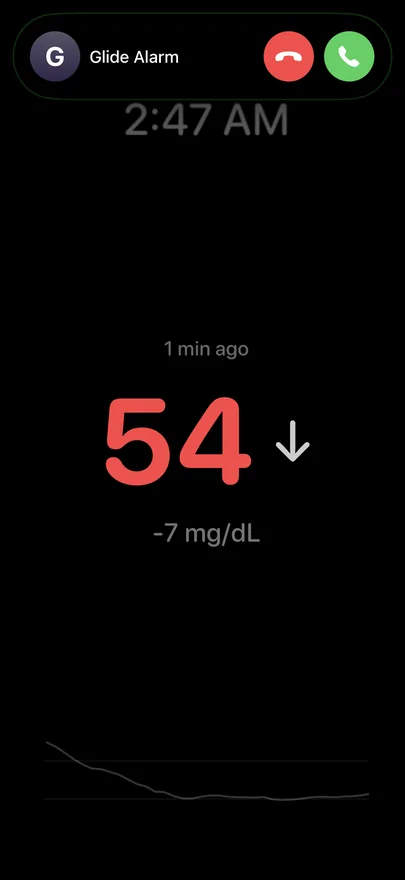
- At night, a real phone call from Glide Alarm. Glide's server places it, so the app does not have to be open.
- Another call every 15 minutes by default (the Snooze setting), until readings come back.
- The chart fills in when the sensor reconnects.
Questions
Do Libre 2 alarms sound in Silent mode or a Focus?
Partly. In the Libre app, the low, high and signal loss alarms override a muted phone and Do Not Disturb by default, and iPhone needs Critical Alerts on. The app's own Silent Mode mutes them. The LibreLinkUp manual tells followers to turn off Do Not Disturb. (Abbott)
Which Glide alerts are Time Sensitive?
Low and Signal lost. Falling fast and Rising fast are not, so a Focus holds them.
What does Glide cost?
Glide is free: readings, the chart, followers, alerts, the nighttime call, the report and the Apple Watch app. Glide Premium ($4.99 a month or $39.99 a year, two weeks free) adds photo carb counting and My Lab's food groups.
More with Glide
Libre 2 with Glide
- Apple Watch
- Widgets & Lock Screen
- Report for the doctor
- How many followers
- Signal loss alert for followers
- Signal loss
- Follower app not updating
- Alarms not sounding
- Follower not getting alerts
Alarms in Silent mode on another CGM
Sources, quoted
- Abbott: “These are all turned on by default and initially set to sound regardless of your phone's sound or do not disturb settings.”
- Abbott: “When Silent Mode is enabled, you will not hear your glucose and signal loss alarms even if you've turned on 'Override Do Not Disturb'.”
- Abbott: “The app's access to Critical Alerts was disabled.”
- Abbott: “Turn off Do Not Disturb.”
Every quote is checked against its source page before each update of this site; last checked 2026-10-06. Makers change their apps; the source page is the authority when it differs.
In the US, Abbott's Libre app replaces the FreeStyle Libre 2 app for new sensors. LibreLinkUp alert settings for Libre 2 differ by the country of the wearer's LibreView account: the US list has no No Recent Data alert.