Glide

For people with T1D and the family who follows them · iPhone

T1D is trial and error. Glide does the science.

From unpredictable spikes to clear patterns: see what works for every meal. Live glucose, meals and doses on one timeline, shared with the people who follow along: a parent, a partner, a sibling.

Download on theApp Store Free to download.
Premium starts with 2 weeks free.
My Lab: repeat meals, each with a plate photo, scored by time in range
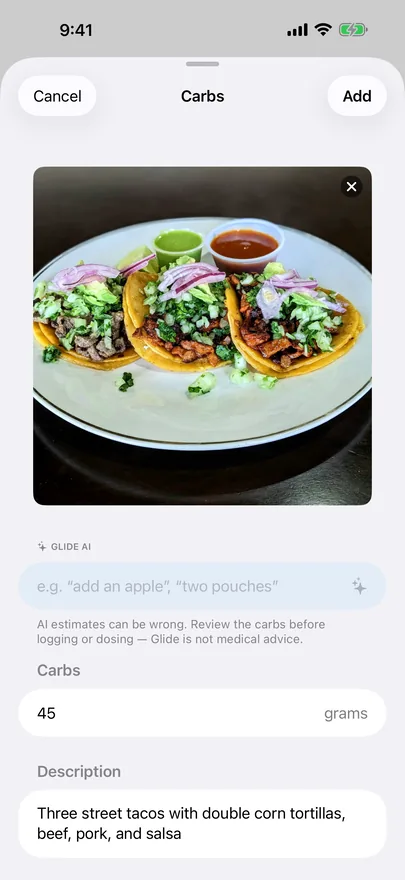
A photo of three street tacos with an AI carb estimate of 45 grams in an editable field
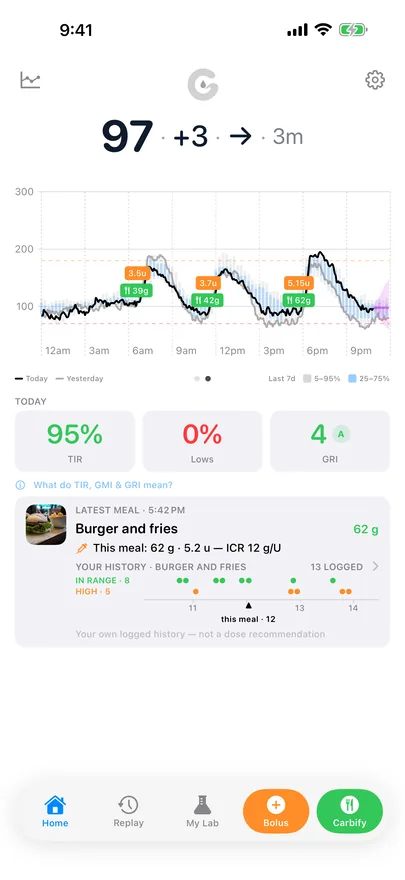
Glide's home screen: live glucose 97 and steady, today's chart with meal and dose markers, 95% time in range, and a meal card showing this meal's logged history

How it works

Every meal you log goes into your own library.

Each entry keeps the plate, the carbs, the dose and the readings that followed. Have the same meal again, and the new day files next to the old ones.

  1. The Carbs editor with a photo of three street tacos and an AI-estimated 45 grams in an editable field

    Log the meal

    Type the carbs, or snap the plate and AI drafts the count in an editable field.

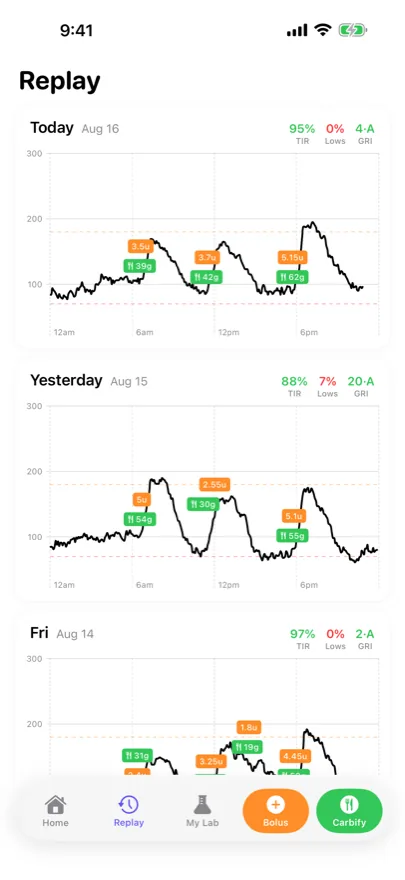
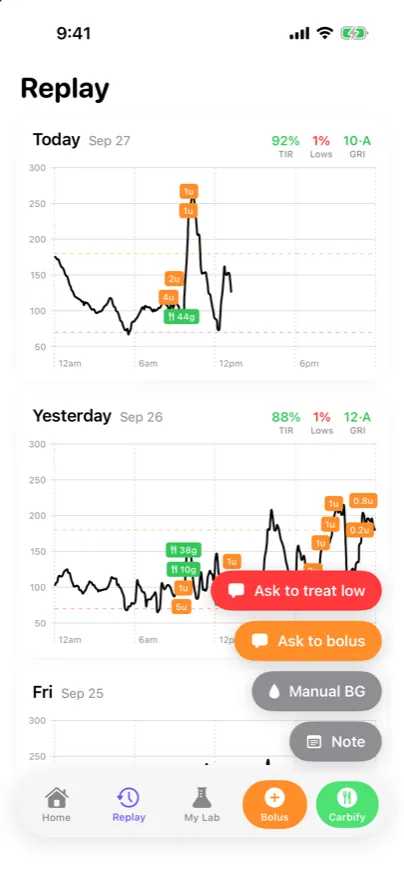
  2. Replay: today, yesterday and Friday as three glucose charts, each with orange insulin chips and green carb chips on the trace, and time in range, lows and GRI above each day

    See meals and doses on the graph

    Meals and doses sit on the CGM chart, from any family phone. Replay goes back day by day.

  3. Home screen with a Latest meal card for burger and fries: 62 g, 5.2 units, ICR 12 g/U, and a history row showing 13 logged, 8 in range and 5 high

    Next time, Glide remembers

    Log the same meal again and Glide shows its history on the Home tab: how many times you logged it, how often you stayed in range, and the insulin-to-carbohydrate ratio (ICR) you used.

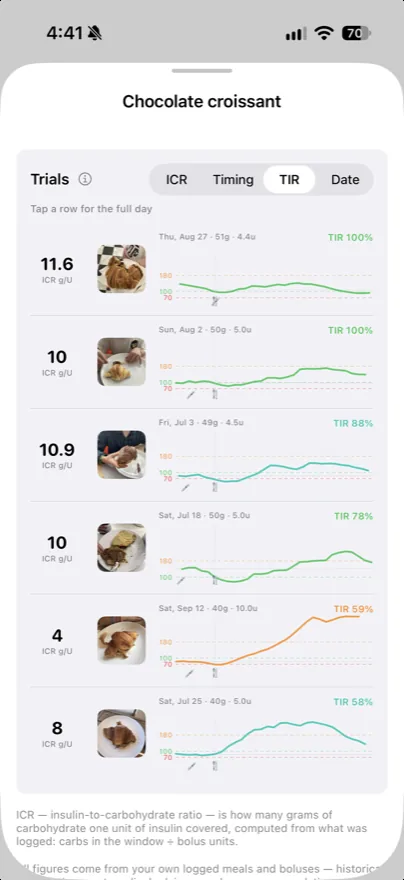
  4. My Lab entry for chocolate croissant: six trials, each with a photo of the plate, the ICR, the date, carbs and units, a small glucose trace with the dose and meal marked, and time in range from 100% down to 58%

    Every repeat, side by side

    The My Lab tab lists each time you logged that meal: the photo, the ICR, the pre-bolus timing, and your time in range afterward.

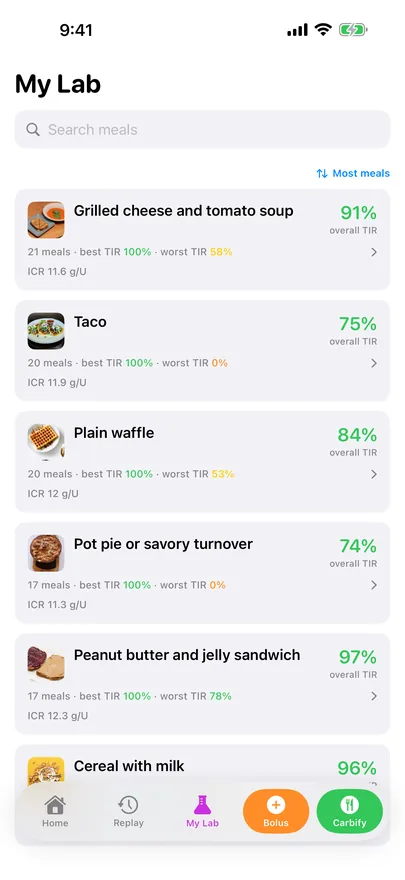
My Lab: a list of repeat meals — grilled cheese and tomato soup, tacos, waffles, pot pie, pb&j — each with a photo of the plate and scored with overall time in range plus its best and worst days

My Lab

Your meal library, scored.

Waffles, tacos, cereal: My Lab files every meal you repeat under one entry and scores each time against what actually happened after. The more you log, the more your library knows.

Scored from your own days

Time in range and median rise per meal, from the meals and readings you logged.

Verdicts wait for repeats

A verdict appears only after enough repeats. A single day proves nothing.

The dose sits next to it

Every trial shows its ICR and pre-bolus timing, so you can compare what you did.

Meal history on the Home tab

Log a meal you’ve had before, and Glide shows how it went on previous days.

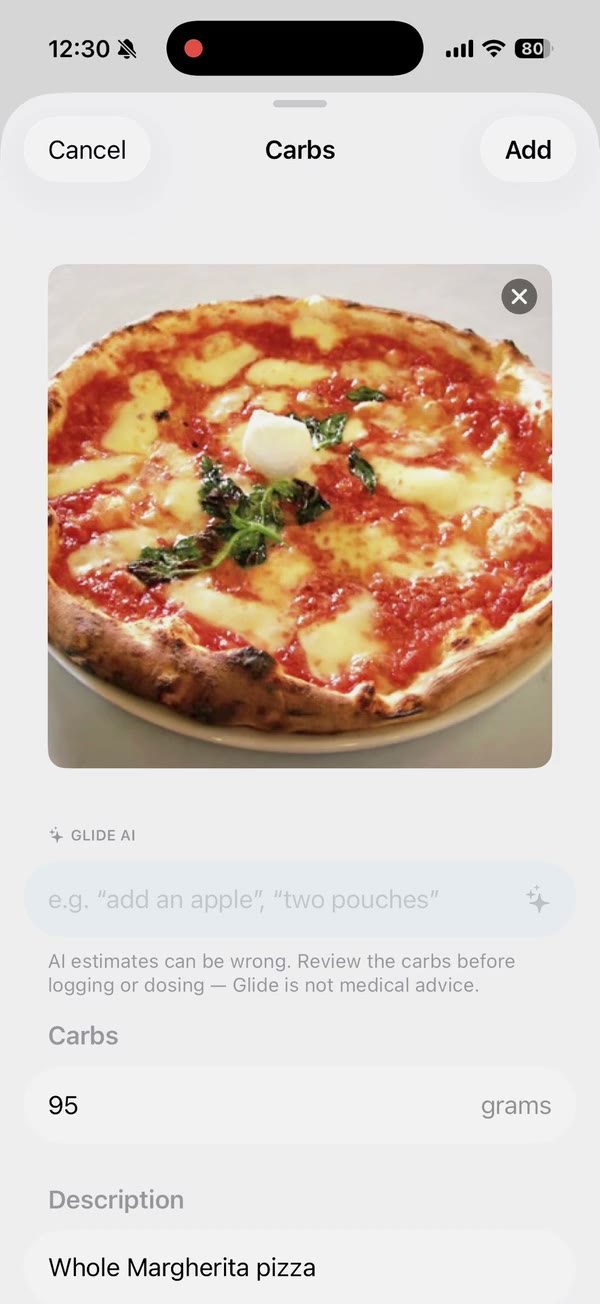
The Carbs editor with a photo of a pizza and an AI-estimated 95 grams in an editable field

Carbify

Snap the plate. Glide drafts the carb count.

AI proposes a count and a description in an editable field. Nothing is logged until you accept it, and the final number is always yours. Refine in plain words: “add an apple”, “only half the rice”.

Measured onAverage missShare of mealWithin ±10 g
Familiar home meals19 of our own weighed meals, shot on a phone2.0 g12% of 17 g89%
Packaged foods, per serving200 products from Open Food Facts, vs. the label3.5 g16% of 22 g91%
Plated meals300 lab-weighed dishes from Nutrition5k11.9 g34% of 35 g57%
Hand-counting by people with T1D448 meals, 50 adults, dietitian-verified (Brazeau et al.)15.4 g21% of 72 g–

As a share of the meal, hand-counting beats our plated estimate. Different meals and protocols, so not a same-test comparison. Method, benchmarks and weak spots.

Lock Screen, alerts & nightstand

When it matters more, it gets louder.

The latest reading stays on the Lock Screen. Lows, fast rises and falls, and lost signal arrive as a banner. A low overnight rings your phone: an actual call, the kind that wakes you. Every threshold, window and interval is yours to set.

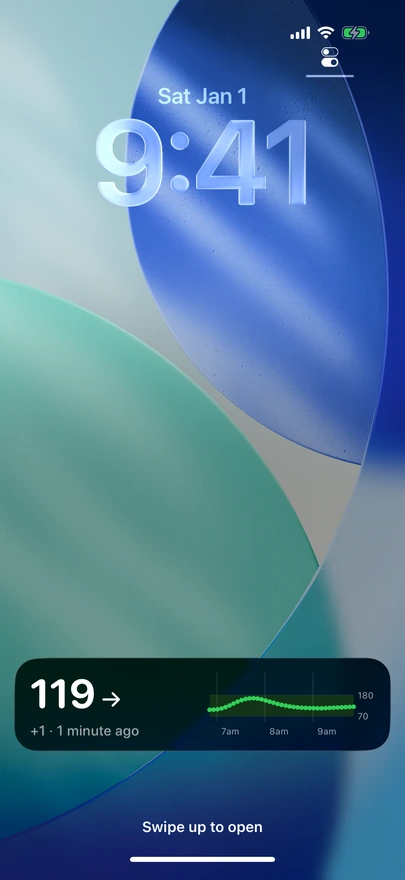
An iPhone Lock Screen at 9:41 with a black Glide Live Activity card: 119, a steady arrow, plus 1, 1 minute ago, and a 3-hour trace inside the 70 to 180 band

Always: the Lock Screen

Turn on Live Activity, and the reading, the arrow and the last 3 hours stay on the Lock Screen and in the Dynamic Island while Glide is closed.

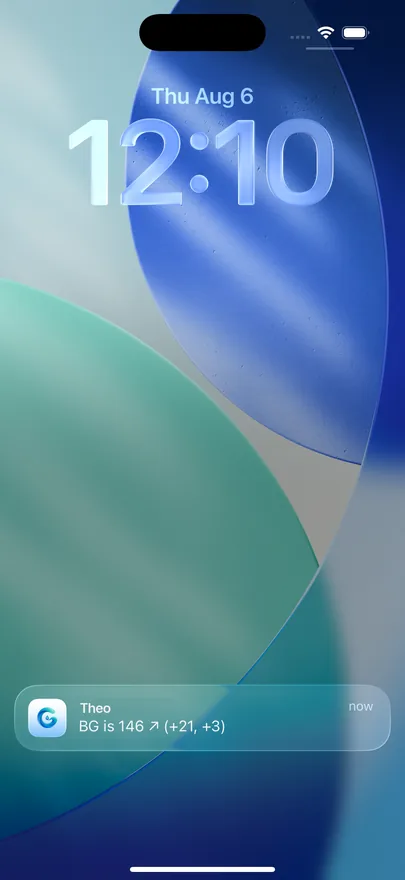
An iPhone Lock Screen at 12:10 with a Glide notification: the name Theo, and the text BG is 146 with a rising arrow and the last two changes, plus 21 and plus 3

Daytime: a banner

The number, the arrow and the last two changes. Read it and move on.

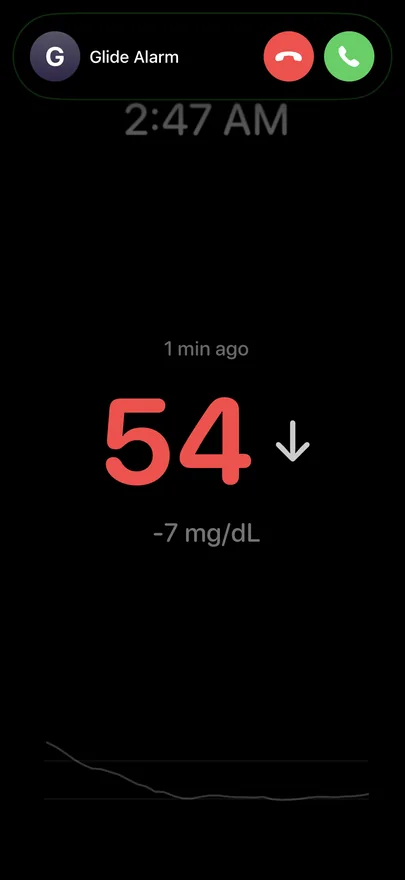
Glide at 2:47 AM showing 54 falling, with an incoming phone call banner from Glide Alarm at the top of the screen

2:47 AM: a call

Cross your low threshold in the hours you pick, and Glide calls, then calls back until the low clears. It also calls when readings stop arriving.

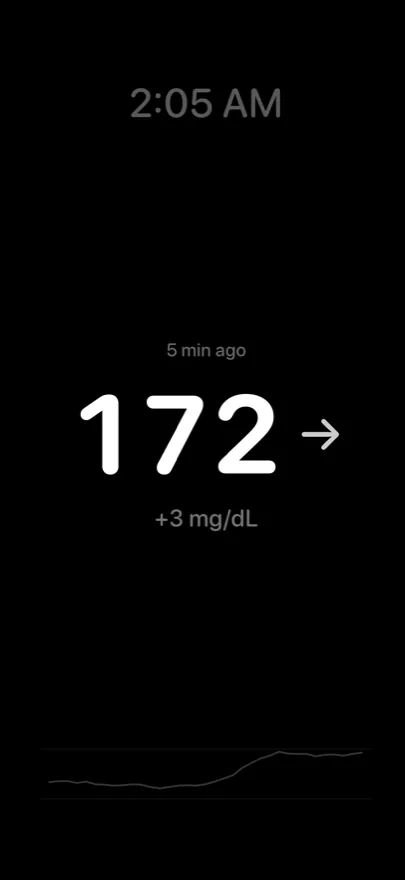
Nightstand mode: a black bedside screen at 2:05 AM showing 172 and steady, with a faint sparkline along the bottom

Nightstand mode

Tap the reading: a black screen with the number, trend, clock and a faint sparkline. It stays awake all night, and your brightness settings stay in charge.

Insights

Which hours cost the most time in range.

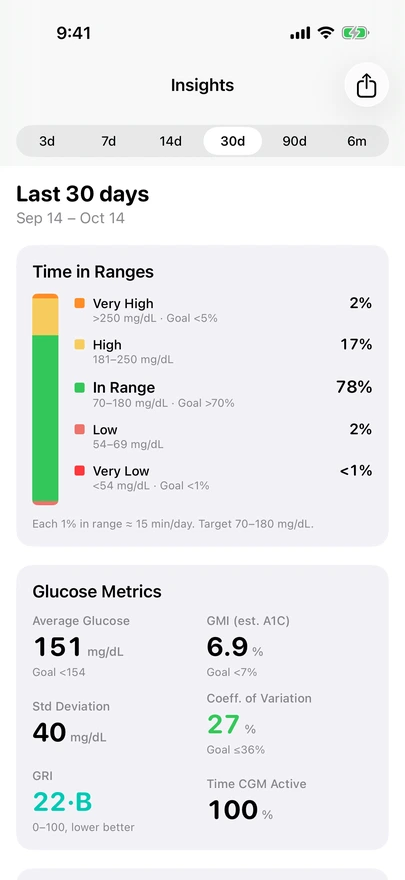
Time in ranges, GMI and GRI for any period from 3 days to 6 months. Below them, Glide compares each hour with your own best 1 in 4 days and names the 3 hours to look at, weekdays and weekends apart. Share the whole period as a PDF for the clinic or the school nurse. Free, for every profile.

Glide Insights for the last 30 days: in range 78%, high 17%, very high 2%, low 2%, very low under 1%; average 151 mg/dL, GMI 6.9%, standard deviation 40, CV 27%, GRI 22·B, CGM active 100%

The clinic numbers

Time in ranges, GMI, GRI with its zone letter, a typical day and daily time in range, against the 2019 consensus goals. The PDF report

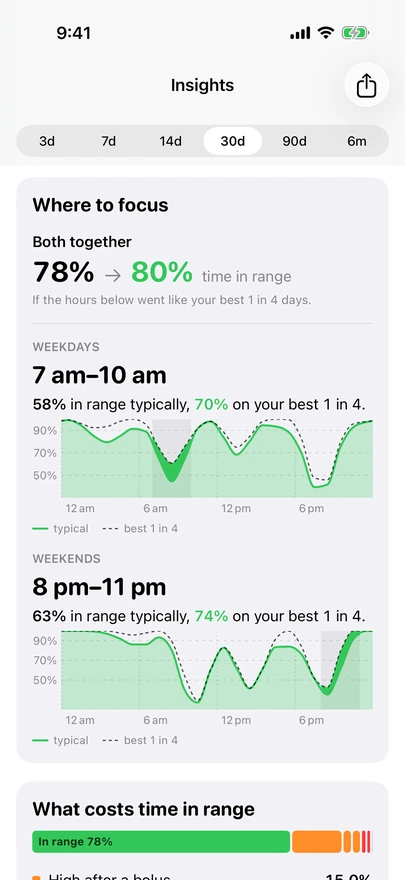
Where to focus: both together 78% to 80% time in range. Weekdays 7 am to 10 am, 58% in range typically, 70% on the best 1 in 4 days. Weekends 8 pm to 11 pm, 63% typically, 74% on the best 1 in 4

Where to focus

Time in range by hour against your own best days. The gap shows where the time goes. How it works

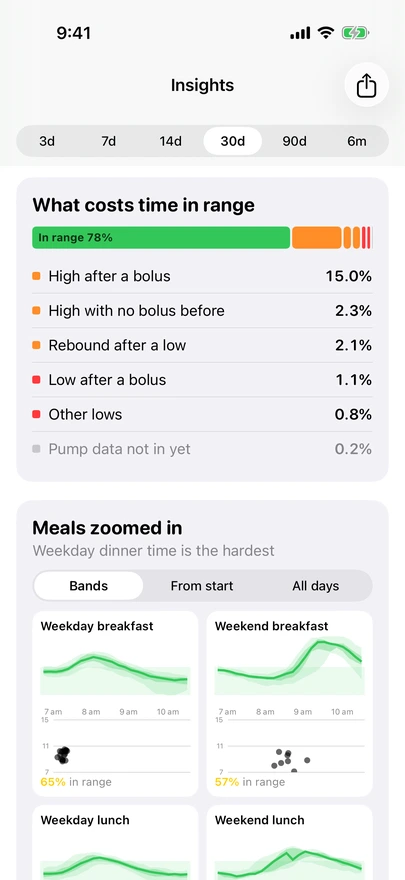
What costs time in range, from pump data: in range 78%, high after a bolus 15.0%, high with no bolus before 2.3%, rebound after a low 2.1%, low after a bolus 1.1%, other lows 0.8%

What costs time in range

With a pump connected (beta): each high or low sorted by what came before it, such as a high after a bolus or a rebound after a low. Below it, breakfast, lunch and dinner as bands. Meal-time spikes

Screens show made-up data. Some of every good day is luck, so the gain is the most you could expect. Observations from your own data, not medical advice.

For the family

One person's numbers on every phone that needs them.

A profile is one person's CGM: your child, your partner, your parent, or you. Everyone who follows signs in with their own account.

Glide's Replay screen on a follower's phone with four options above the held Carbify button: Ask to treat low in red, Ask to bolus in orange, and Manual BG and Note in gray

Following someone else's CGM

Ask them to act, from your phone.

Ask to treat lowAsk to bolus

Press and hold Carbify to see four options: Ask to treat low, Ask to bolus, Manual BG and Note. Slide to either “Ask to” option and let go to send a notification to their phone, regardless of their Glide alert settings. Sending a request doesn’t log a meal or dose, and the message contains no insulin amount. When they log the bolus or carbs, it appears on your chart. They can also answer: hold Carbify and tap On it, and every follower gets a notification.

The two requests are available to followers. For example, a parent can send one to a child who owns the profile and uses Glide on their own phone.

Join with a one-time code

The owner makes an invite code in Settings → Followers. It works once and expires after 7 days.

Everyone can log

Any follower can add, edit or delete a meal or a dose. It shows on every phone that follows the profile.

The owner can remove anyone

Access ends right away, and the profile's data is cleared from that person's phone.

One subscription for all

Anyone on the profile can buy Premium, and it covers everyone. Followers see that the profile is covered, not who pays.

Each person's own units

Grandma can read mmol/L while you read mg/dL. Units and display settings belong to each account.

For any age

An adult connects their own CGM and invites a partner or a sibling. For a child, a parent runs the profile; under 13, a parent agrees in the app.

Shortcuts

Shortcuts on the Home tab.

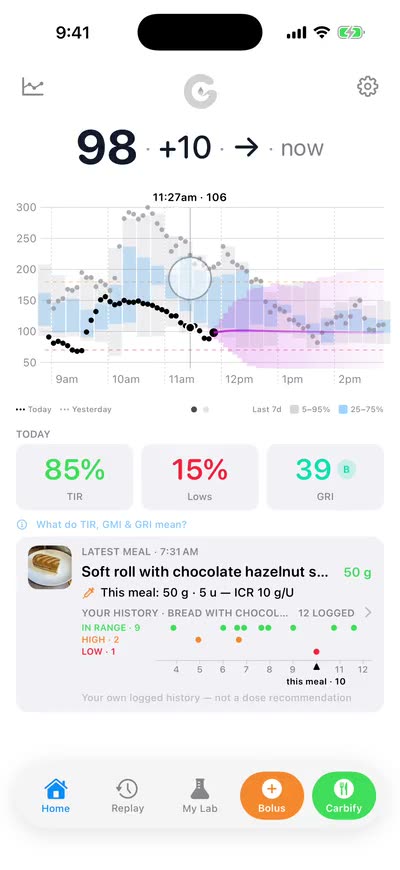
The Home graph with a cursor held at 11:27am, reading 106

The exact number from earlier today

Hold the graph, then slide. A cursor follows your finger and shows the time and the reading at each point.

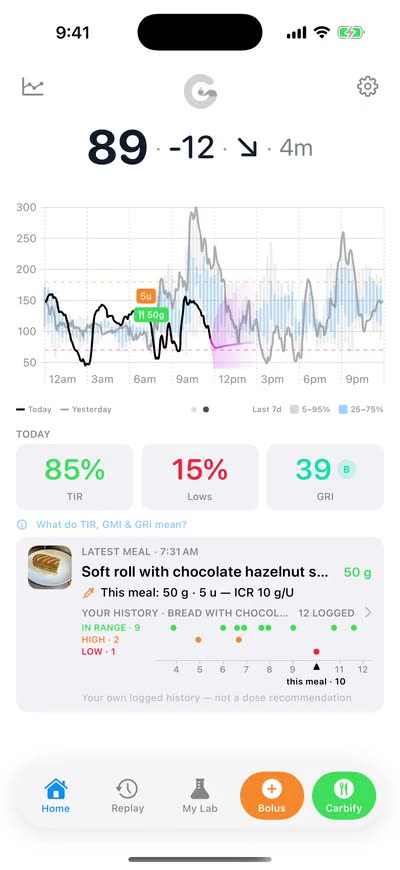
The Home graph showing the whole day, midnight to midnight

The next 3 hours, or the whole day

Swipe the graph sideways. It flips between 3 hours back with the 3-hour forecast, and the whole day.

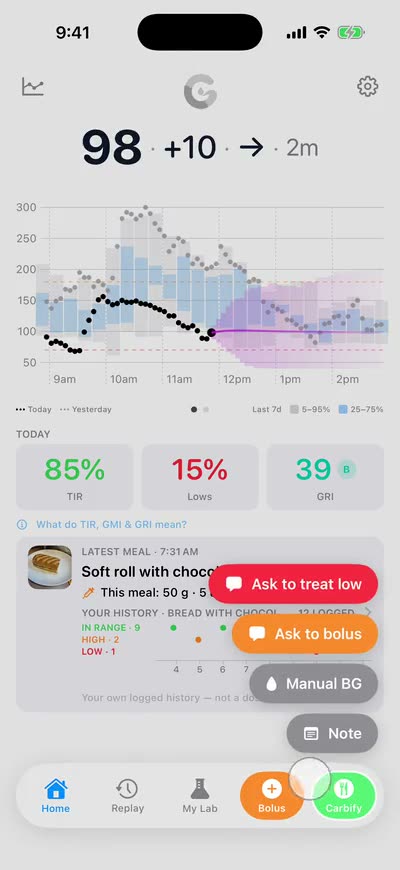
Four pills above the Carbify button: Ask to treat low, Ask to bolus, Manual BG and Note

A fingerstick or a note in one move

Press and hold Carbify, slide to Manual BG or Note, and let go. If you follow someone, you’ll also see Ask to treat low and Ask to bolus.

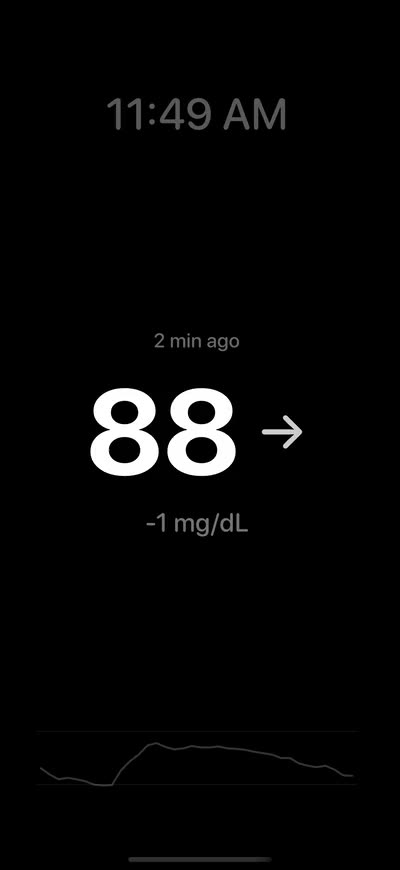
The black nightstand screen: 88 and steady, the clock and a faint sparkline

A screen for the nightstand

Tap the reading. A black screen shows the number, the trend and the clock, and stays awake. Tap once more, or swipe up or down, to leave.

Privacy

Where your data goes, and how to delete it.

Each line below links to the part of the privacy policy that says it.

Not sold, not used for ads

Data goes only to the providers that run Glide, such as AWS for hosting.

Who we share data with →

No ad SDKs or third-party trackers

Product analytics are anonymous and not tied to you.

What we collect →

Photos go to AI only when you tap

The AI provider keeps no copy and does not train on it. Type the carbs instead, and nothing goes to the AI provider.

AI carb estimates →

Sign-out clears the phone

On a shared family phone, signing out removes the cached health data from the device.

Security →

Stored in the US, encrypted at rest

AWS, region us-east-1. All connections use HTTPS.

Security →

Delete it yourself

Settings → Delete account removes the account, and for an owner, the profile's readings, events and photos.

Retention & deletion →

Connect your CGM and pump

Three CGMs and Nightscout, plus two pumps in beta.

Glide gets the readings through each maker's own sharing service, or from your Nightscout site. In the app: Settings → CGM, or Set up monitoring on a new account. Pumps connect in Settings → Pump. Anyone else joins that profile with an invite code instead.

Dexcom G6 · G7

Reads through Dexcom Share

  1. In the wearer's Dexcom app, turn on Share.
  2. In Glide, pick Dexcom and enter the wearer's own Dexcom login.
  3. Pick the Dexcom server: United States, or outside the US.

A Dexcom Follow login won't work. Only the wearer's account can share readings.

Full guide: followers, lost signal, troubleshooting

FreeStyle Libre 2 · 3 · 3 Plus

Reads through LibreLinkUp

  1. Use any LibreLinkUp follower account of the wearer: one you already use in the LibreLinkUp app, or a new one. To add a new one, invite it from the wearer's Libre app (Connected Apps → LibreLinkUp).
  2. Make sure that account has signed in to the LibreLinkUp app once and accepted its terms.
  3. In Glide, pick Libre and enter that LibreLinkUp login. Glide finds the region itself.

The wearer's own Libre or LibreView login won't work. Glide reads through a LibreLinkUp follower account.

Full guide: followers, lost signal, troubleshooting

Medtrum EasySense

Reads through EasyFollow

  1. Make a new EasyFollow account just for Glide.
  2. From the wearer's EasySense app, invite that account as a follower.
  3. In Glide, pick Medtrum, enter that EasyFollow login, and pick Europe or France.

The wearer's own EasySense login won't work. Glide reads through a follower account.

Full guide: followers, lost signal, troubleshooting

Nightscout Beta

Reads your Nightscout site

  1. On your Nightscout site, open Admin tools → Subjects and add a subject with the role readable.
  2. Copy that subject's token.
  3. In Glide, pick Nightscout and enter the site address and the token.

Your API_SECRET won't work. Glide accepts only a read-only token, so it can never write to your site.

Full guide: followers, lost signal, troubleshooting

Pumps, in beta

The profile owner connects the pump. Glide imports boluses and the carbs entered in the pump's bolus calculator. Home and Replay show them as outlined labels (Settings → Display → Show pump doses), and a bolus also logged in Glide within 15 minutes shows once. Insights and My Lab's By time of day use them too. Basal is not imported. Dose from the pump, never from Glide.

Tandem t:slim X2 · Mobi Beta

Reads through Tandem Source

  1. Make sure the Tandem app uploads the pump to Tandem Source.
  2. In Glide, open Settings → Pump and pick Tandem.
  3. Enter the wearer's own Tandem Source login, and pick United States or outside the US.

Tandem has not approved this connection. Glide reads Tandem Source the way tconnectsync does, so a Tandem change can stop imports until Glide is updated. The Tandem app uploads about once an hour, so data can be over an hour old.

Omnipod 5 and other pumps Beta

Reads through Glooko

  1. Make sure the pump's app uploads to Glooko.
  2. In Glide, open Settings → Pump and pick Glooko.
  3. Enter the Glooko login you use at my.glooko.com, and pick United States or outside the US.

Glooko has not approved this connection. Data arrives when the pump's app syncs, and Glide checks every hour. From Glooko, Glide also reads the pump's carb ratio and correction factor for each time of day, which the forecast can use.

Pricing

Live glucose is free for the whole family.

One Premium subscription covers everyone on the profile: the owner and every follower.

Free

$0

Always

  • Live glucose on every family phone
  • Log and edit meals, doses and fingersticks
  • Replay any day on one timeline
  • Banner notifications
  • Live Activity on the Lock Screen and Dynamic Island
  • Nightstand mode
  • 3-hour glucose forecast
  • Time in range, GMI and GRI, shared as a PDF for clinic day
  • Pump boluses and carbs from Tandem or Glooko (beta), on the chart and in Insights
  • My Lab by time of day, from the pump's meals
  • Followers with one-time invite codes
  • "Ask to bolus" and "Ask to treat low" for followers

Premium

$7.99 / month

or $59.99 / year · first 2 weeks free

  • Everything in Free
  • Carb count from a photo of the plate
  • Barcode scan for packaged food
  • My Lab: repeat meals scored, with verdicts
  • Meal-time and ICR tips on Home
  • Nighttime call alarm for lows and lost signal

Why I built this

The kid who tested the same candy for a week

Juicebox Podcast episode #217 tells the story of a teenager who loved one candy and could never get it right. He bought a week's worth, got one of the first CGMs, and ran the same experiment every day (dose, eat, watch the numbers, adjust) until he found what worked for him.

Single days lie. The same meal and the same dose give a different number, and the only way through is repetition. Most families don't have the energy for that, because T1D already takes all of it.

Glide is that week of testing, made automatic: every meal logged in seconds, every outcome scored, every repeat compared.

— Jan, building Glide for my kid

Questions

FAQ

Which CGMs work with Glide?

Dexcom G6 and G7, FreeStyle Libre 2, 3 and 3 Plus, Medtrum EasySense, and any CGM that uploads to a Nightscout site (beta). See Connect your CGM for the login each one needs.

Does Glide read my pump?

In beta, from Tandem Source (t:slim X2, Mobi) or Glooko (Omnipod 5 and other pumps). Imported boluses and carbs show on the chart as outlined labels, and in Insights. Dose from the pump, never from Glide. Details.

Does Glide tell me how much insulin to take?

No, never. Glide shows your own logged history and what followed; dosing decisions stay with you and your care team. It is not a medical device. Keep your CGM app and the rest of your usual diabetes tools running exactly as they are.

Who can use it?

Anyone can hold an account. Under 13, a parent agrees in the app when the account is created. Parents can also run the profile from their own phone, and family members join with a one-time invite code.

What does the forecast show?

The next three hours if you take no further action, from recent readings and the insulin and carbs you logged, with a cone sized from its own measured errors. How it works.

Who pays when the family shares a profile?

Any one account on the profile can subscribe, and Premium then covers everyone on it. Followers see that the profile is covered, not who pays.
Start with the next meal.

Connect your CGM, invite the family, and snap dinner tonight.

Download on theApp Store