Guide
A CGM report PDF for the clinic or the school nurse
What belongs on the page, and how to make one from your phone.
What a report should show
The 2019 International Consensus on Time in Range lists the CGM numbers a clinic visit is built on. A report that carries these lets anyone reading it compare with the published goals:
| Number | Consensus goal, most adults with type 1 |
|---|---|
| Time in range, 70–180 mg/dL | over 70% |
| Time below 70 mg/dL | under 4% |
| Time below 54 mg/dL | under 1% |
| Time above 180 mg/dL | under 25% |
| Time above 250 mg/dL | under 5% |
| Coefficient of variation | 36% or less |
| Days of data, share of time the CGM was active | 14 days, 70% |
Most reports add GMI, the A1c that the average glucose predicts (Bergenstal 2018), and a typical day drawn as a median with percentile bands. Low episodes are counted by the 2017 consensus rule: one starts after 15 minutes in a row below the threshold.
What Glide's PDF puts on each page
| Page | Contents |
|---|---|
| 1 | Period, days with data, CGM, target range and unit. Time in ranges. Average glucose, GMI, standard deviation, coefficient of variation, GRI with its zone letter, time CGM active. Lows and nights: time in range, time below 70 and 54, and low episodes, for the whole day, 6 am to midnight and midnight to 6 am. |
| 2 | The typical day (median, middle 50% and 5–95% bands) and daily time in range with a 7-day average. |
| 3 and on | The last 14 days, newest first, one chart each with the meals and doses logged in Glide, and each day's time in range, lows and GRI. |
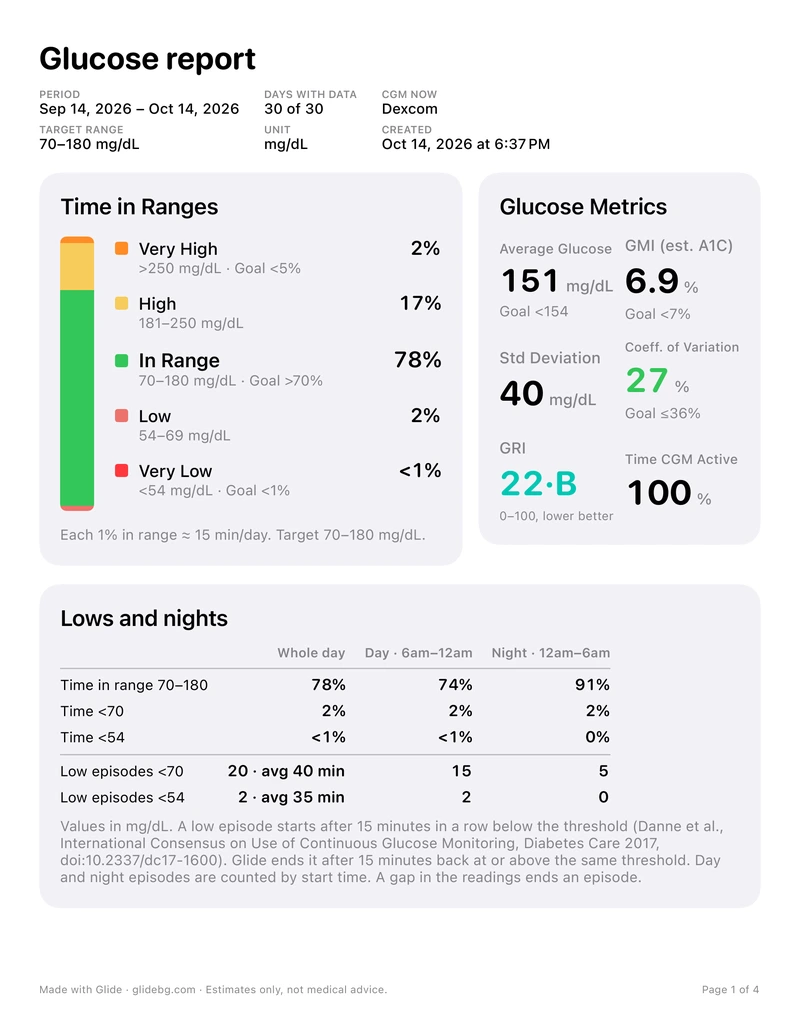
The PDF leaves out Glide's Where to focus and meal-time cards on purpose: those compare you with your own best days, which is a what-if, not a measurement.
How to make one
- On Home, tap the chart button to open Insights.
- Pick the period: 3, 7, 14, 30 or 90 days, or 6 months. The PDF covers the same period.
- Tap the share button and pick Mail, Messages, AirDrop or Files.
The PDF is made when you share it and is not stored by Glide. It is free, prints on US Letter or A4 by your region, and works with Dexcom, Libre and Medtrum. Your CGM maker's own app can make reports too: see Dexcom G7 and the other devices under CGM features and fixes.