How to set it up in Glide
- Connect the Libre 2: in Glide, tap Connect a CGM and enter a LibreLinkUp follower login. Full setup.
- On Home, tap Insights.
- Pick the period: 3 to 180 days (30 by default).
- Tap Share report as PDF and send it by email, Messages or AirDrop.
What you see
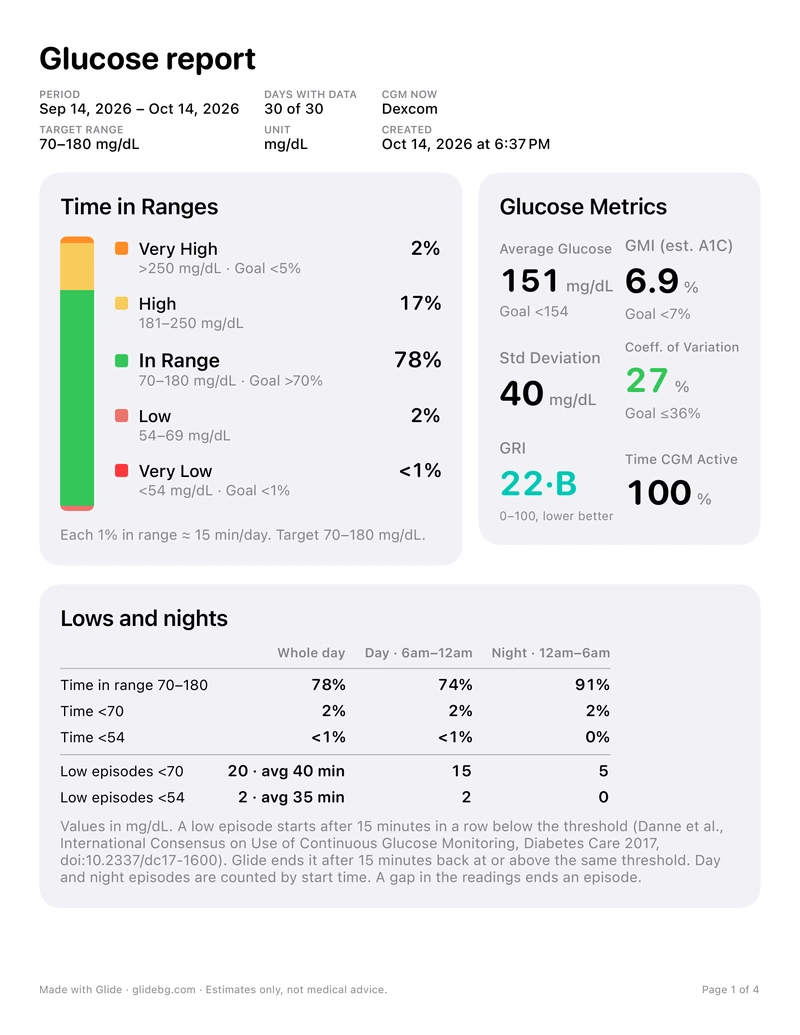
- Page 1: time in ranges, the metrics, and lows and nights.
- Page 2: the 24-hour profile and the time in range trend.
- A daily view for each day of the period.
- The period, the days with data, the CGM and the target range at the top.
Questions
How does the Libre 2 app share data with the doctor?
Yes. The wearer shares data with a clinic through LibreView, either from an email invite or by entering the clinic's ID in the app or on LibreView. (Abbott)
What does Glide cost?
Glide is free: readings, the chart, followers, alerts, the nighttime call, the report and the Apple Watch app. Glide Premium ($4.99 a month or $39.99 a year, two weeks free) adds photo carb counting and My Lab's food groups.
More with Glide
Libre 2 with Glide
- Apple Watch
- Widgets & Lock Screen
- Alarms in Silent mode
- How many followers
- Signal loss alert for followers
- Signal loss
- Follower app not updating
- Alarms not sounding
- Follower not getting alerts
Report for the doctor on another CGM
Sources, quoted
- Abbott: “Option 1: Ask a healthcare provider to email an invite.”
- Abbott: “Option 2: Enter a healthcare provider’s ID.”
Every quote is checked against its source page before each update of this site; last checked 2026-10-06. Makers change their apps; the source page is the authority when it differs.
In the US, Abbott's Libre app replaces the FreeStyle Libre 2 app for new sensors. LibreLinkUp alert settings for Libre 2 differ by the country of the wearer's LibreView account: the US list has no No Recent Data alert.