Side by side
From each maker's own documents, checked 13 November 2026. Not stated means the documents say nothing, not that the app cannot do it. All ten apps.
| Glide | Sugar Sense |
|---|---|
| Price | |
| Free, including the call. Photo carbs and My Lab are Premium: $4.99 a month or $39.99 a year for the whole profile source | Free: readings, every alert, Care Circle. Premium $39.99 a year or $9.99 a month; Family $59.99 a year for up to 6 people. Widgets, Live Activity, the watch apps, CarPlay and the emergency call are Premium source source |
| Phones and other screens | |
| iPhone and Apple Watch, widgets, Live Activity. Android on Google Play. No web or CarPlay source source source | iPhone, Android, Apple Watch, Wear OS, Garmin, web, browser, Mac, Windows, Alexa, CarPlay. Widgets, Live Activity, the watches and CarPlay are Premium source source |
| CGMs | |
| Dexcom G7, G6 (through Share); Libre 2, 3, 3 Plus (LibreLinkUp); Medtrum EasySense (EasyFollow); any CGM on a Nightscout site (beta) source source source | Libre 2, 3 (LibreLinkUp); Dexcom G6, G7, ONE (Share); Nightscout; Apple Health, Health Connect source |
| Low and high alerts | |
| Low and high; the high is off until you turn it on source | Low, high, and a predictive “heading-low” about 20 minutes ahead; followers get the same low and high alerts source |
| Rise and fall alerts | |
| Falling fast, rising fast source | Rapid rise, rapid fall source |
| Alert when readings stop | |
| Banner after 15 to 120 minutes, your choice (30 by default) source | A “missed-reading safety net” (Android listing); the wait is not stated source |
| Sound on a silenced iPhone | |
| Alerts set to Alarm: yes, as a Critical Alert (Low and Signal lost on a new account). Regular alerts: no, but they show during a Focus that allows Time Sensitive. Call: rings through Silent and Focus with Emergency Bypass source source | An alert sounds through Silent only when its priority is set to Critical source source |
| Phone call | |
| On a low and on lost signal, in the night hours you set, to US, Canada and Europe numbers (free) source | Emergency call on urgent lows (Premium); hours and countries not stated source source |
| Log meals and insulin | |
| Meals, insulin, notes, fingersticks, from any family phone source | Meals, insulin, activity, medication, notes, meter readings source source |
| Photo carb estimate | |
| Yes (Premium), with published error numbers source | Yes (Premium; the first 3 scans are free) source |
| Find repeats of a meal | |
| On its own, from the words you log for each meal (My Lab, Premium) source | Not stated; its pattern insights name “the meal that keeps sending you over range” source |
| Setup | |
| The wearer's Dexcom login, a LibreLinkUp or EasyFollow follower account, or a read-only Nightscout token source source source | A LibreLinkUp or Dexcom Share login, or a Nightscout address and read-only token source |
Where Sugar Sense is stronger
- Wear OS and Garmin, plus a web dashboard, a browser extension, Mac and Windows apps, Alexa and CarPlay. Glide runs on iPhone, Apple Watch and Android.
- A predictive "heading-low" alert about 20 minutes ahead.
- Apple Health and Health Connect sync, and CSV export.
- Your own ChatGPT or Claude can read your data (Premium), and a free 14-day summary to paste into any AI chat.
Try Glide beside Sugar Sense
- Connect the CGM in Glide: tap Connect a CGM and pick it. Setup for each model.
- Invite the family: Settings → Followers → Invite a follower. Each person installs Glide, taps Watch someone else's glucose, enters the code and taps Join.
- On your phone, go to Settings → Notifications, turn on Signal lost and set No reading for (30 minutes by default, 15 to 120).
- For the night: Settings → Phone Alerts → Add a phone number. Enter a mobile number (outside the US, with its country code) and the code Glide texts you.
- Under Wake-up call, set the hours (10 PM to 8 AM by default). Under When to call, keep Call on signal loss on.
- Tap Add caller to Contacts. In Contacts, open that contact, tap Edit → Ringtone and turn on Emergency Bypass, so the call rings through Silent and Focus.
- Tap Send a test call.
What you see
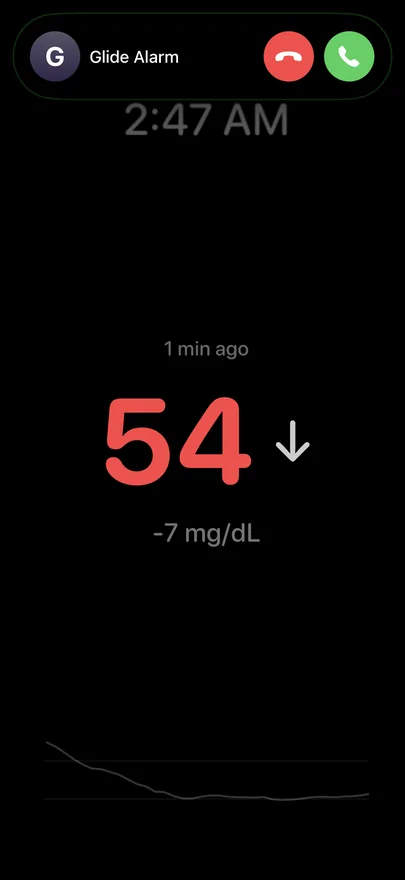
- At night, a real phone call from Glide Alarm. Glide's server places it, so the app does not have to be open.
- Another call every 15 minutes by default (the Snooze setting), until readings come back.
- The chart fills in when the sensor reconnects.
Questions
Can I keep Sugar Sense?
Yes. Glide reads the same data, so Sugar Sense and Glide work side by side.
Does Glide replace the CGM's alarms?
No. Glide is not a medical device. Keep the alarms on in the wearer's CGM app.
What does Glide cost?
Glide is free: readings, the chart, followers, alerts, the nighttime call, the report and the Apple Watch app. Glide Premium ($4.99 a month or $39.99 a year, two weeks free) adds photo carb counting and My Lab's food groups.
More with Glide
Other comparisons
Glide's maker wrote this page. Glide is not affiliated with or endorsed by the maker of Sugar Sense. If a cell is wrong or out of date, write to [email protected] and we fix it.